MAIN MENU MOVED TO THE BOTTOM OF THE BLOG!

ads


Sign up for PayPal and start accepting credit card payments instantly.

Search This Blog

Showing posts with label Tablets. Show all posts

Monday, October 5, 2015

WhatsApp Web - wanna use it?

Part 1 - Using Google Chrome & Android

This WhatsApp Web review (as we go on) is from an end-user perspective. I am a late WhatsApp user - just had a samsung smartphone with android version 4.2.2. I had opted to use WhatsApp Web, due to my physical shortcomings. You may like WhatsApp Web, if you like to try - here’s how, Kindly note that WhatsApp Web is browser based.

1] Checking your Browser.

Firstly, you have to check that your browser is ‘compatible’ with WhatsApp Web. As for me, I have been religiously using Google Chrome, for Chrome the version needed is minimum ver36 or above. To check your browser’s version – just key in whatversion.net in the navigation bar and once that page is fully loaded just press on the browser you are using, in my case the Chrome (for now I cannot advice you on the versions of other browsers need to operate WhatsApp Web) I am using is:-


2] to use WhatsApp Web - Follow this simple steps here:-
Open this site on your browser (by keying in the navigation bar)  
: - Web.whatsapp.com         
Open WhatsApp on you android (I am using Samsung)
In Chat tab, Go to WhatsApp Web menu and pressed it[the green buttons tell you where & how to get the relevant menu]


3] "Camera mode" will be activated automatically, scan the QR code on the screen with the phone, in the required location [square boundary on your phone], let the phone read the code, a scanning cursor is there as a guide. An Example of the QR code is given below. Please remember to “tick” where the green notification is, to avoid having to activate WhatsApp Web frequently.
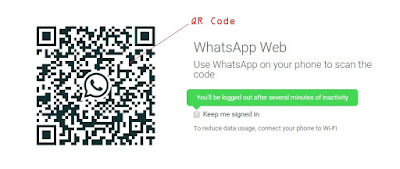
Your phone need to be "on" and stay connected all the time, to the internet to use WhatsApp Web on PC.

<end of part 1>


Wednesday, October 23, 2013

Apple unveils new iPad Air

Published on 23 Oct 2013 Apple unveils new iPad Air : Apple unveils its latest thinner, faster tablet, the iPad Air, at an event in San Francisco, California. The company's senior vice president, Phil Schiller, describes it as 'the biggest step yet' in delivering their iPad vision. The company also released a new version of the iPad Mini.


Sunday, March 10, 2013

4G technoloy & smart glasses:

FRANCE 24 Tech 24 - Mar 9, 2013 : Digital technology is now at the centre of many important world events, impacting everything from politics to economics to culture.


Monday, October 29, 2012

Windows 8: Is It Worth The Upgrade?


Windows 8 has been at the forefront of discussion for the weeks leading up to its launch on Friday. The company says that Windows 8 is the future – a world where traditional desktop computing and touch computing can live in harmony. A future where all your content is at your fingertips at all times. So is the future worth it?
more from source  >>


Friday, January 13, 2012

Tablets at Annual Consumer Electronics Show.

Published on 12 Jan 2012 by Euronews - The annual Consumer Electronics Show in Las Vegas is, say the organisers, gadget heaven. They expect around 150,000 people to visit the show for a first look at some of the new gadgets being shown by around 2,700 exhibitors.

Intel is hoping to corner a new market with their "Ultrabook." An ultraportable laptop, it's very small and light but boasts standard performance by using low-power Intel processors.


Fujitsu Computer Systems Corporation