MAIN MENU MOVED TO THE BOTTOM OF THE BLOG!

ads


Sign up for PayPal and start accepting credit card payments instantly.

Search This Blog

Showing posts with label skills. Show all posts

Monday, October 5, 2015

WhatsApp Web - wanna use it?

Part 1 - Using Google Chrome & Android

This WhatsApp Web review (as we go on) is from an end-user perspective. I am a late WhatsApp user - just had a samsung smartphone with android version 4.2.2. I had opted to use WhatsApp Web, due to my physical shortcomings. You may like WhatsApp Web, if you like to try - here’s how, Kindly note that WhatsApp Web is browser based.

1] Checking your Browser.

Firstly, you have to check that your browser is ‘compatible’ with WhatsApp Web. As for me, I have been religiously using Google Chrome, for Chrome the version needed is minimum ver36 or above. To check your browser’s version – just key in whatversion.net in the navigation bar and once that page is fully loaded just press on the browser you are using, in my case the Chrome (for now I cannot advice you on the versions of other browsers need to operate WhatsApp Web) I am using is:-


2] to use WhatsApp Web - Follow this simple steps here:-
Open this site on your browser (by keying in the navigation bar)  
: - Web.whatsapp.com         
Open WhatsApp on you android (I am using Samsung)
In Chat tab, Go to WhatsApp Web menu and pressed it[the green buttons tell you where & how to get the relevant menu]


3] "Camera mode" will be activated automatically, scan the QR code on the screen with the phone, in the required location [square boundary on your phone], let the phone read the code, a scanning cursor is there as a guide. An Example of the QR code is given below. Please remember to “tick” where the green notification is, to avoid having to activate WhatsApp Web frequently.
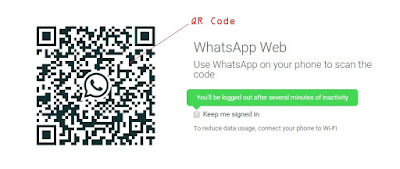
Your phone need to be "on" and stay connected all the time, to the internet to use WhatsApp Web on PC.

<end of part 1>


Tuesday, July 2, 2013

Bangladeshi Hackers Attacked Malaysian Website

hacked-by-tiger-mteKUALA LUMPUR- Several websites with the ‘.com.my’ and ‘.MY’ domains experienced technical issues when it was hacked this morning  by a group known as TiGER-M@TE.
Several major websites that were affected include Google, Dell, Microsoft, MSN Malaysia, Bing, and Kaspersky.

The frontpage of the website was changed with the following text, “Hello Malaysia, you think you are more advanced than us? Respect our workers, we will respect you! Running it since 2007.”

Last month, at least 41 government agencies’ website faced technical difficulties after it was hacked by an international group of hackes known as ‘Anonymous.’

In May, PKR president Datuk Seri Dr Wan Azizah Wan Ismail’s blog was allegedly hacked to give an impression that a ‘sex video’ purportedly involving her daughter, Nurul Izzah Anwar, was genuine.

In March, Google experienced a technical glitch after a search for “Sabah” showed a result in which the state was described as “illegitimate”. The incident happened during the Malaysia-Filipino standoff over Sabah’s sovereignty.

Meanwhile Google denied its website was hacked. - MD | source


Thursday, October 25, 2012

Internet & 'muslims' cupid service!

Half Our Deen Offline

Published on Oct 24, 2012 by ummahfilms : The reality is that Muslim Single events that use the speed dating process just don't work. Half Our Deen takes a revolutionary approach at helping Muslim get married. Instead of playing a game of musical chairs like other events, HOD Offline uses a series of activities to allow it's participants to learn about each other in a deeper way. The results speak for themselves.


Thursday, September 20, 2012

Islamic hackers threaten Bank of America and NY Stock Exchange

Justin Sullivan / Getty Images / AFP
The Bank of America’s online banking site suffered occasional problems Tuesday after threats on the internet that a cyber-attack would be launched on the bank and other US targets in protest at a film mocking Islam.
A message on pastebin.com claiming to be from ‘cyber fighters of Izz ad-din Al qassam’- a reference to the military wing of Hamas- declared that it would attack the Bank of America and the New York Stock Exchange as a first step in a campaign against “American Zionist Capitalists”.
The posting promised to continue aggressive actions until the “erasing of the nasty movie”, which although YouTube has blocked in volatile regions, remains available in other parts of the world.
The film in question, a privately funded short-movie, mocking the Prophet Mohammad, has ignited days of demonstrations.The uproar has left many dead across the Arab world, including Africa, Asia and some Western countries.
A Bank of America spokesman told Reuters that the website had suffered some problems but was available to customers.
But customers contacted by Reuters in Michigan, Ohio, Georgia and New York said they couldn’t access the site.
The threat to the New York Stock Exchange has seemingly not materialized as trading continued as normal.
Bill Pennington, chief strategy officer at WhiteHat Security, told the weekly magazine InformationWeek that the problems on the Bank of America website do not necessarily mean they’ve been hacked.
“It’s reasonable to suppose it could be a coincidence,” he said, citing the recent GoDaddy outage, which was an internal technical error for which hackers claimed responsibility.
But he did concede that the website’s problems could also be the result of hackers, saying that hacking was “pretty easy”.
He said that only the perpetrators and possibly the victims [the Bank of America] will ever really know what happened.
Pennington warned that businesses should expect more attacks, “It’s probably going to get worse before it gets better,” he said.
source here  | 20 Sept 2012  >>

Sunday, September 2, 2012

Cyberwar 4G.

What does a government or cybercommand do when it has 2 billion more potential targets to shoot at and defend against in a period of four years?

More than 20 years ago a number of us were warning allied governments and defense organizations about a number of key developments.

Class I Information Warfare: The loss of privacy and Identity Theft Class II: Private espionage and organized cybercrime Class III: Nation-state, NGO and terrorist use of Internet technologies as offensive weapons. We were ignored. Defense groups said, “if it doesn’t explode, it’s not ours,” and Congress said, “why would a criminal or terrorist ever want to use the Internet…?”

Now we know. And here it comes again.

The smart phone is just a computer. It’s highly mobile, it’s prolific and it’s growing in power. The ITA estimates that in 2014, 4.2 billion IP endpoints will populate the Earth.

Governments will face two distinct sets of problems due to the coming onslaught

Should we allow the use and integration of devices that present tremendous security problems? We are going to have to defend against an additional 2 billion intelligent endpoints that will have similar attack capabilities to conventional fixed computers. Thus, CND of not only state-managed assets, but of critical infrastructures, will become a greater challenge than ever before.

CNA operations will find a much larger target suite, if they can in fact identify bad actors with high degrees of certainty.

Both are indeed daunting technical hurdles that, as usual, favor the bad actors.

What are the answers?

We know what doesn’t work, so we shouldn’t try it again. Schwartau has a few thoughts on the subject.

Disclaimer: We are a infosec video aggregator and this video is linked from an external website. The original author may be different from the user re-posting/linking it here. Please do not assume the authors to be same without verifying.


Published on Apr 21, 2012 by hzvprod : Winn Schwartau perform a talk about the next battlefield on cyberwarfare and expose his vision of this one.


source here  >>>


Tuesday, August 14, 2012

Password Dos and Don’ts

There’s a saying when it comes to online passwords: they’re like a toothbrush. That’s because you want a good toothbrush (just like a password), you should change it often (just like a password) and you should never share it (just like a password!).

There are some key dos and don’ts that can help:

DON’T

  • use personal information that could be easily guessed or accessed, like your birthday (which happens more often than you might think) — it’s easy for you to remember, but easy for someone shady to find 
  • use actual words that you can find in actual language (any language) 
  • use the same password for all of your accounts


DO


  • use a different password for each account 
  • combine capital letters, numbers and special characters 
  • change your password once every three months or so — and immediately if a site notifies you of a security breach 
  • use the Master Password feature in Firefox (more on that here.


By now you’re probably thinking, “I can’t remember my keys in the morning. How am I supposed to remember all these new passwords all the time?”

Here are a few steps to creating easy-to-remember passwords that are still secure.


  1. Choose a phrase — let’s try “The quick brown fox jumps over the lazy dog.” 
  2. Use the first letter in each word and capitalize the first one: Tqbfjotld 
  3. Make it stronger by adding a special character: Tqbfjotld! 
  4. Now, associate it with each website you log in to. For example, you could use YT for YouTube, FB for Facebook, your bank’s initials — you get the point. So your password would now look like this: 


YTTqbfjotld! (for YouTube)
FBTqbfjotld! (for Facebook)
and so on, and so on…

Choosing secure passwords will go a long way to keeping you safe online.

Original here | 7 Aug 2012


Saturday, August 11, 2012

9 Things You Absolutely Must Do to Keep Your Online Identity Secure

We've been reeling a bit ever since Mat Honan was the victim of that ruthless social hack that wiped all his devices. Sure, that was an extreme case. But it's also one that could happen to anyone, at any time. So we put together a list of the best ways to make sure your internet self—your accounts, your cash, and your information—stays secure.

Fortify Your Passwords
Password strength is vital to your frontline defense. Obviously your password should be a combination of letters and numbers, but don't stop at the bare minimum. Use uppercase letters in random spots. Subsitute numbers for letters. Mash multiple word phrases together. Deliberately misspell those words. Space them out. If you're feeling particularly hardcore, you can just create a random string of characters. In fact, XKCD's excellent comic sums this up in a way more eloqent than any words could. 

9 Things You Absolutely Must Do to Keep Your Online Identity Secure

Oh, and for the love Woz, don't use the same password for everything. Particularly not your most sensitive (read: banking) accounts

All HTTPS, All The Time
Many of the vital online services (Google, Facebook, Twitter, etc.), allow you to only connect to their servers via an HTTPS connection. This will encrypt any stream of data between you and the service, ensuring that anyone using Firesheep or a packet sniffer on a (usually public) Wi-Fi network can't glean your login data. Never work at a coffee shop without it.

Secure Those Security Questions 
Just the security questions are a backup doesn't mean you shouldn't put the same thought into them as you password. Use numbers instead of letters. Mash entire phrases together into one word. Deliberately misspell things. Or best of all, Kaspersky Labs expert Dmitry
Bestuzhev explains, don't directly answer the security question at all:


  1. The tips are quite simple but effective. Since all social engineering attacks work based on the information of interest for the victim or the information related to the victim, it's important to provide secret questions with the answers absolutely not related to it.
  2. For example, for the question "What is the name of your first pet?" I would register an answer like sw3SwuTu 
  3.  When I bought my last car... The vendor provided me with a list of secret questions and I had to provide them with the secret answers they registered in their systems. So, instead of providing real answers I provided a password like the [aforementioned] one. They said I was the first customer to do this and they congratulated me.
  4.  ... So, basically the rule is never provide real answers for the secret questions."

Saturday, July 28, 2012

Najib antara 25 pemimpin dunia paling aktif berhubung di Twitter


Perdana Menteri Datuk Seri Najib Tun Razak
KUALA LUMPUR - Perdana Menteri Datuk Seri Najib Tun Razak disenaraikan sebagai seorang daripada 25 pemimpin dunia yang paling aktif berhubungan di Twitter, dalam laporan yang diterbitkan oleh Burson-Marsteller. 

Laporan yang diterbitkan baru-baru ini, dikenali sebagai Twiplomacy, merupakan kajian pertama seumpamanya di peringkat global mengenai pemimpin-pemimpin dunia di Twitter. 

Laporan itu meletakkan Presiden Amerika Syarikat Barack Obama sebagai pemimpin dunia yang perkembangannya paling banyak diikuti di Twitter manakala akaun Najib sebagai nombor 2 di Asia dan nombor 17 di dunia daripada  254 ketua kerajaan dan negara dan institusi mereka. 

Ia juga menyenaraikan Najib sebagai pemimpin dunia keenam paling popular yang "tweets properly" -- hanya 30 daripada 254 ketua negara dan kerajaan yang sebenarnya menulis entri mereka sendiri di Twitter. 

Najib mula menulis di Twitter pada 23 Sept, 2008 dan setakat hari ini, beliau mempunyai 767,679 pengikut di Twitter dan menulis 2,675 tweets dan 81 'following'.
       
Ini menjadikan beliau setakat ini pemimpin paling popular di Asia di Twitter, per kapita (1 dalam 37) dan selesa dalam kedudukan 10 terbaik di peringkat global. 

baca semua | sinar 28 July 2012


Monday, July 16, 2012

How lone grad student scooped government and what it means your online privacy


Jonathan Mayer had a hunch.
Article imageA gifted computer scientist, Mayer suspected that online advertisers might be getting around browser settings that are designed to block tracking devices known as cookies. If his instinct was right, advertisers were following people as they moved from one website to another even though their browsers were configured to prevent this sort of digital shadowing. Working long hours at his office, Mayer ran a series of clever tests in which he purchased ads that acted as sniffers for the sort of unauthorized cookies he was looking for. He hit the jackpot, unearthing one of the biggest privacy scandals of the past year: Google was secretly planting cookies on a vast number of iPhone browsers. Mayer thinks millions of iPhones were targeted by Google.
This is precisely the type of privacy violation the Federal Trade Commission aims to protect consumers from, and Google, which claims the cookies were not planted in an unethical way, now reportedly faces a fine of more than $10 million. But the FTC didn't discover the violation. Mayer is a 25-year-old student working on law and computer science degrees at Stanford University. He shoehorned his sleuthing between classes and homework, working from an office he shares in the Gates Computer Science Building with students from New Zealand and Hong Kong. He doesn't get paid for his work and he doesn't get much rest.
read more : 30 June 2012

Monday, June 11, 2012

Apple announces 2012 Design Award winners.

A NICE WAY TO 'CATCH' POTENTIAL EMPLOYEES!

What were some of the best looking apps made in the past year? Apple's published the winners of its annual Design Awards show.


(Credit: Apple)
What were the prettiest, or otherwise design-centric apps made on Apple's platforms this year?
The results are in.
Apple's Worldwide Developers Conference continues through the rest of this week, though the annual Apple Design Awards show is in the can. This is the event where the company recognizes the achievements of developers who created particularly well-designed software, be it in looks or overall functionality.
Among some of the winners are popular games like Halfbrick's Jetpack Joyride and Playdead's Limbo, alongside creation apps like Bohemian Coding's Sketch for the Mac, and Paper for theiPad by FiftyThree.
Apple began its annual design awards program in 1997 under the moniker the "Human Interface Design Excellence," changing to its current name just a year later. Those who win get promotion on Apple's developer site, as well as a cube-shaped award that glows when picked up. The design for that cube, which has been made by Palo Alto, Calif.-based Sparkfactor Design since 2003, was once put through a CT scanner by an award winner to see how it worked.
A full list of winners from this year's show is below. All links lead to those apps in their respective App Stores.
iPhone Winners
Company: Fingerlab

Company: Halfbrick Studios

Company: National Geographic Society / Rally Interactive

iPad winners
App: Paper 
Company: FiftyThree Inc

Company: GameCollage

Company: Fingerlab

Student winners
App: DaWindci (iPad)
Company: Reality Twist GmbH, Mimimi Productions, Mediadesign Highschool of Applied Sciences

App: Little Star (iPad)
Company: BiBoBox Studio, Dalian Nationalities University

Mac winners
Company: Feral Interactive Ltd

App: Limbo
Company: Playdead ApS

App: Sketch
Company: Bohemian Coding


Sunday, March 11, 2012

Seven hidden, superuseful Facebook features

Get the scoop on seven little-known Facebook features that will take your social networking addiction to the next level.
See tip No. 5 to find out how to enlarge thumbnails when you hover over
them with your mouse.  (Credit: Screenshot by Sharon Vaknin/CNET)
We're all Facebook pros. With the average user spending 8 hours per month on the insanely addictive social network, it's no surprise we're quick to pick up Facebook's incessant changes and updates.
In the mess of Facebook's perpetual construction zone, you might have missed some hidden, key features that make using the service that much easier. Most of these tricks were gathered over time, and have now become a part of my regular Facebook routine.
1. Sign in with your username (unique URL). 
Instead of typing out your entire e-mail address each time you sign in, use your username (the one that leads people to your profile, like facebook.com/sharonvak) instead. Even if your info is auto-filled, this trick will save a hassle when you're prompted to sign in on your mobile device or public computers.

2. Remove events without declining. 
One day it was there, and the next, it was gone. For the longest time, Facebook offered a "Remove from events" link at the bottom of every event page, so that you could delete the event from your invites without rudely declining.

Now, that option is hidden. To remove an event without declining, find your name in the guest list (left), hover over it, and click the x. Click Okay to confirm. The organizer won't be notified of your action.
3. Use the Favorites list. 

Use the little-known Favorites feature for quick access to your most frequented lists and groups.
(Credit: Screenshot by Sharon Vaknin/CNET)

Facebook has a little-known feature that lets you bookmark your favorite apps, pages, and groups from the home page. It's the list on the left of the News Feed, just below your profile picture. Find out how to use the feature here.

4. Rearrange your Timeline modules. 
The four boxes below your cover photo can customized to your liking. Click the arrow with the number (on the right) to expand all your apps. Then, hover over a box, click the pencil, and you'll see an option to swap the box with something else, or remove it entirely. For more tips on customizing your Timeline profile, click here.

5. Hover over photo thumbnails to zoom. 
This feature isn't built in to Facebook, but after months of using it, it sure feels like it. Facebook Photo Zoom, a free browser extension, enlarges thumbnails and photos when you mouse over them. It's super useful when browsing through the News Feed and you want to see what a photo looks like without clicking the thumbnail and prompting a new page.

Here's the Chrome extension, and a similar one forFirefox.
6. Check your Other messages. 
You might have hundreds of unread messages that Facebook has filed in your Other inbox. Find out where it is and how to manage it.

7. Prevent tagged posts from automatically displaying on your Timeline. 
Friends. They mean well, but sometimes cross the line when tagging you in a post or photo you'd rather not make public to your friend list. Thankfully, Facebook gives you the option toapprove tagged posts before they go live on your Timeline and in the News Feed for all your friends and family to see.

Go to Account > Privacy Settings and select Edit settings next to "How tags work." Then hit Edit next to Profile Review and you'll be prompted to turn on the settings. Now, every time someone tags you in a status, photo, or place, you'll receive a notification and will be asked to approve the tag.
Check out this blog for more Facebook privacy tweaks.

Thursday, October 6, 2011

Study: Texting while driving doubles danger risk.

Published on 6 Oct 2011 by CBS - New research shows that texting while driving can more than double your reaction time, making it comparable to driving while drunk. Scott Pelley


Monday, June 20, 2011

The Google hacker!

Chinese cooking school named

AlJazeeraEnglish on 13 Jun 2011 - Google recently accused hackers in China of breaking into the personal accounts of U-S officials. They say the attack originated from a cooking school in the city of Jinan.Beijing has denied any state involvement, despite admitting the existence of an elite cyber wing of the People's Liberation Army.

Melissa Chan reports from Jinjan, China.


Thursday, February 3, 2011

"rendering the Geneva and Hague conventions in cyberspace" : Proposal for cyber war rules of engagement


John Bumgarner from US Cyber Consequences Unit on current threats
The world needs cyber war "Rules of Engagement" to cope with potentially devastating cyber weapons, Russian and US experts will tell world leaders at a security conference on Friday.
The cyber proposal, seen exclusively by Newsnight, comes from the influential EastWest Institute in New York.
It describes "rendering the Geneva and Hague conventions in cyberspace".
Cyber security is on the agenda at the annual Munich Security Conference for the first time this year.
Those attending the conference include UK Prime Minister David Cameron, German Chancellor Angela Merkel, US Secretary of State Hillary Clinton and Russian Foreign Minister Sergei Lavrov.
Fujitsu Computer Systems Corporation